
In previous posts and conferencne presentations I’ve mentioned forgts, a package that reads a formatted spreadsheet and produces a gt table with the same cell and text formatting. The idea was to make it easier to show spreadsheet data with colors and highlighting in presentations and reports across formats (PDF, HTML) without having to paste screenshots.
Recently, Jan Marvin Garbuszus released gtxlsx, which goes the other way: it takes a gt table and writes it into an openxlsx2 workbook (i.e. an ‘Excel Spreadsheet’), preserving the formatting. This means that now we can round-trip a formatted spreadsheet: first read it into R with forgts, (optionally) do something to the gt object, and then write it back out with gtxlsx.
forgts

forgts reads the data in a spreadsheet, imports the text and cell formatting (font face and color, cell borders, cell fills, etc.), and applies it to a gt version of the data.
gtxlsx takes a gt table and lays it out as cells in an openxlsx2 workbook, keeping the heading, column spanners, row groups, stub, summary rows, footnotes, and styling.
Round trip example
We can use the rodentsheet.xlsx file that comes bundled with forgts. This is what it looks like:
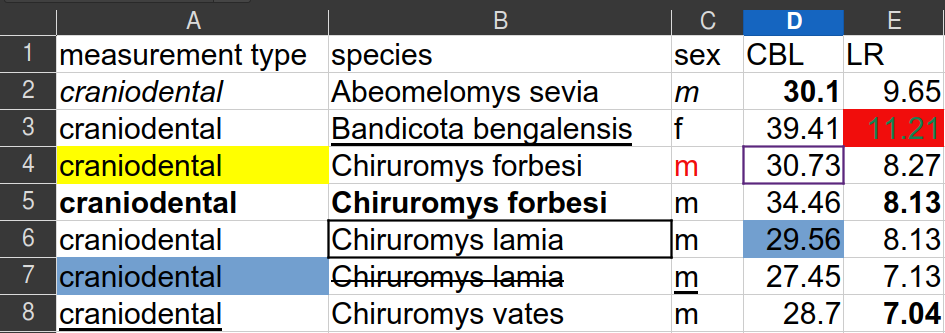
Import with forgts:
library(forgts)
library(gt)
library(openxlsx2)
library(gtxlsx)

example_spreadsheet <- system.file("extdata/rodentsheet.xlsx", package = "forgts")
gt_tbl <- forgts(example_spreadsheet)
gt_tbl
This gives us a gt object with the same formatting as the original spreadsheet:
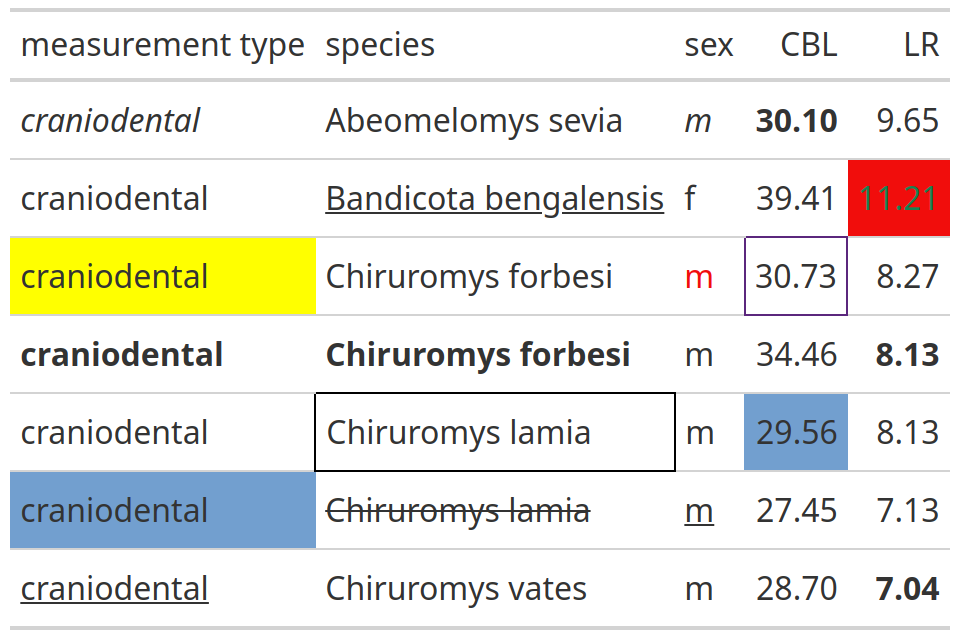
Now we can write it back to a spreadsheet with gtxlsx:
wb <- wb_workbook()$add_worksheet(grid_lines = FALSE)
wb <- wb_add_gt(wb, gt_tbl)

# save it
wb_save(wb, "rodentsheet_roundtrip.xlsx")

# or open interactively
if (interactive()) wb$open()
The resulting file has the same data and formatting as the original: cell fills, font styles, borders, and all.
Who cares?
Spreadsheets are not going away. Being able to read them into R, work with them as proper display tables, and write them back out means we can stay in R for reporting pipelines that start and end in Excel without losing the formatting that makes the data interpretable, even if this invovles questionable practices in data organization.
Links: